
all news
Which Raptor Z arm combo suitable for you?

Jun
Since June 1, 2025, the Raptor Z Pro has been sold out. This article therefore focuses on the following options:
- Raptor Z – XY
- Raptor Z – ISO
- Raptor Twin Z
Important Notes Before We Begin
Although Raptor ISO has gone through multiple updates (currently Version 5), all ISO versions from ISO1 to ISO5 share the same core functionality.
They do not support overslung setups.
To keep things simple and easier to understand, we will refer to all versions collectively as Raptor ISO.
The same approach applies to Raptor XY.
When Should You Use Raptor Twin Z?
If you are already using Twin Z built into the Raptor Z arm, the Raptor Twin Z is fully compatible with MOVI XL setups, supporting payloads of up to 45 kgs.
Both overslung and underslung configurations are supported.

When the Twin Z is paired with Raptor Air, the system can carry much heavier payloads—up to 64 kg maximum. This allows for more demanding and heavier camera setups.
⚠️ Important:
The final payload capacity of the entire system is still limited by the ISO dampener used.
For example, if you pair the setup with Raptor ISO5, the maximum payload will follow the limits of ISO5, not the arm itself. Please keep this in mind when configuring your system.
When Should You Choose Raptor Z – ISO or Raptor Z – XY?
At their core, both Raptor Z – ISO and Raptor Z – XY combine the full performance of Raptor Air with either Raptor ISO or Raptor XY, delivering professional-grade stabilization.
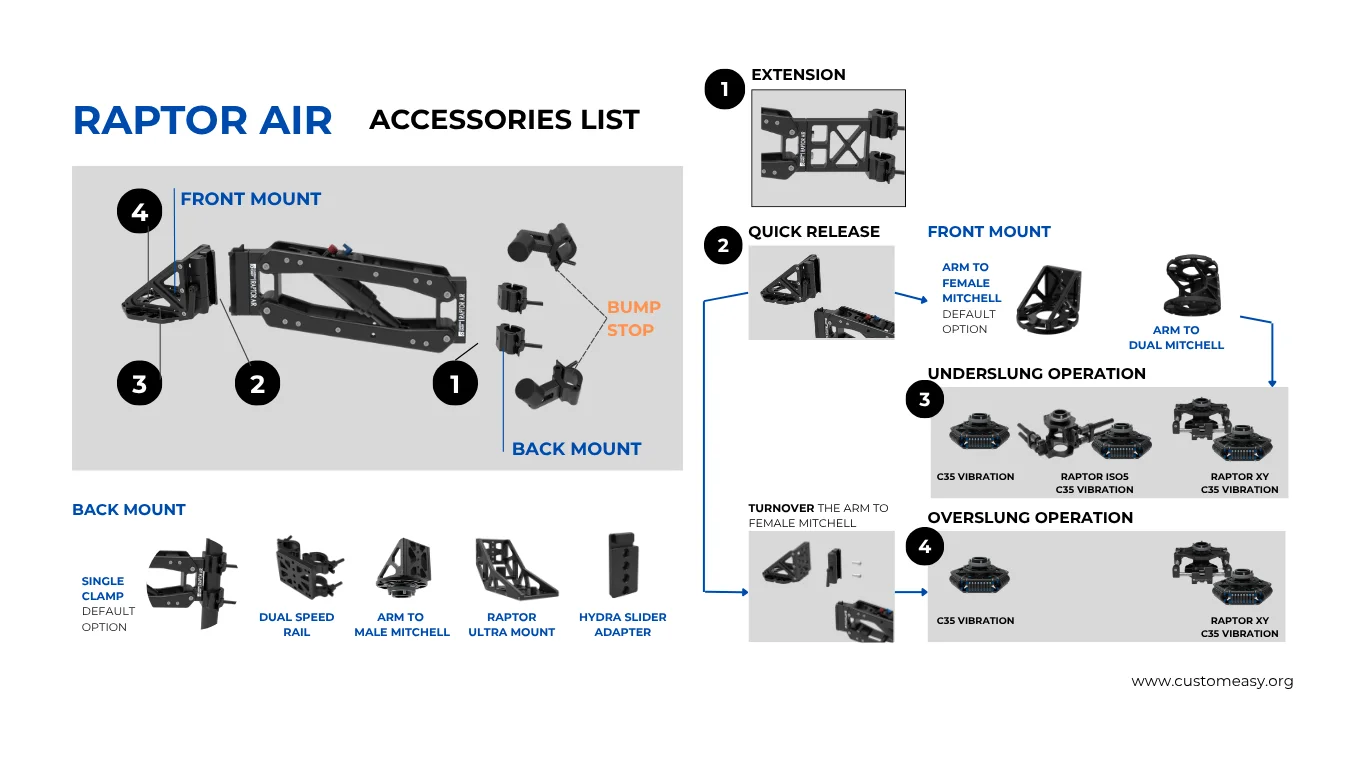
Please refer to the image below for visual reference.

Raptor ISO – Horizontal stability designed specifically for remote heads.
While the physical design may vary across ISO versions, performance improvements are carried forward into newer models. The latest versions inherit and refine the strengths of earlier ones.

Raptor XY – Top-tier X- and Y-axis vibration isolation for ultra-smooth, professional footage.
Raptor XY is ideal when vertical and lateral vibration control is critical, especially for high-end cinematic applications.

Your choice between Raptor ISO and Raptor XY depends entirely on your specific application and shooting requirements.
Each option excels in its intended use case—choose the one that best matches your setup and workflow.
How to Switch from Underslung to Overslung
To make the switch easier, we recommend adding an Arm to Dual Mitchell bracket. This allows for quick changes between underslung and overslung setups using a Mitchell-based connection—and helps maintain proper vibration isolation.
Important Note: The Raptor ISO does not support overslung operation.
How much speed Raptor Z arm support?
More detail here:
| Overslung | Underslung | |
| Raptor Twin Z | 60km/h | 100km/h |
| Raptor Z – ISO | 40km/h | 100km/h |
| Raptor Z – XY | 60km/h | 80km/h |
> Let’s find the correct answer for you!
We hope that this article brings you helpful information and clears the knots you are looking for. And, if you need any further assistance, please contact us at contact@customeasy.org